Results & Review
After running evaluations, Truesight provides tools to analyze outcomes and feed insights back into your workflow. The Results page shows evaluation outcomes, while the Review Queue lets you flag and correct individual assessments.
Viewing results
Navigate to Results in the sidebar to see evaluation outcomes across your datasets. Results display:
- Per-example judgments: The final assessment for each example in your dataset
- Criteria breakdowns: How each criterion was scored
- Judge reasoning: The rationale behind each judgment
For example, given this input:
{
  "user_query": "How do I return a jacket?",
  "bot_response": "You can return any item within 30 days. Visit your Orders page and select Return Item."
}
The results might show:
| Criterion | Judgment | Reasoning |
|---|---|---|
| Factual Accuracy | Pass | The response correctly states the 30-day return policy and accurately describes the return process through the Orders page. |
| Response Completeness | Fail | The response mentions the return window but does not specify whether the customer needs to pay for return shipping or if a prepaid label is provided. |
This level of detail helps you understand exactly why each judgment was made and where to focus improvements.
Filtering and sorting
You can filter results by:
- Live evaluation: Filter to a specific live evaluation
- Status: Filter by outcome (Success or Failed)
This helps you focus on the examples that matter most. For instance, you can filter to see only failed evaluations. You can also export results for further analysis.
Review Queue
The Review Queue is where you manually assess evaluation results that need human attention. It creates a feedback loop between automated evaluation and human expertise.
How it works
- Flag results from the Results page that you want to examine more closely
- The Review Queue collects flagged items, grouped by evaluation run
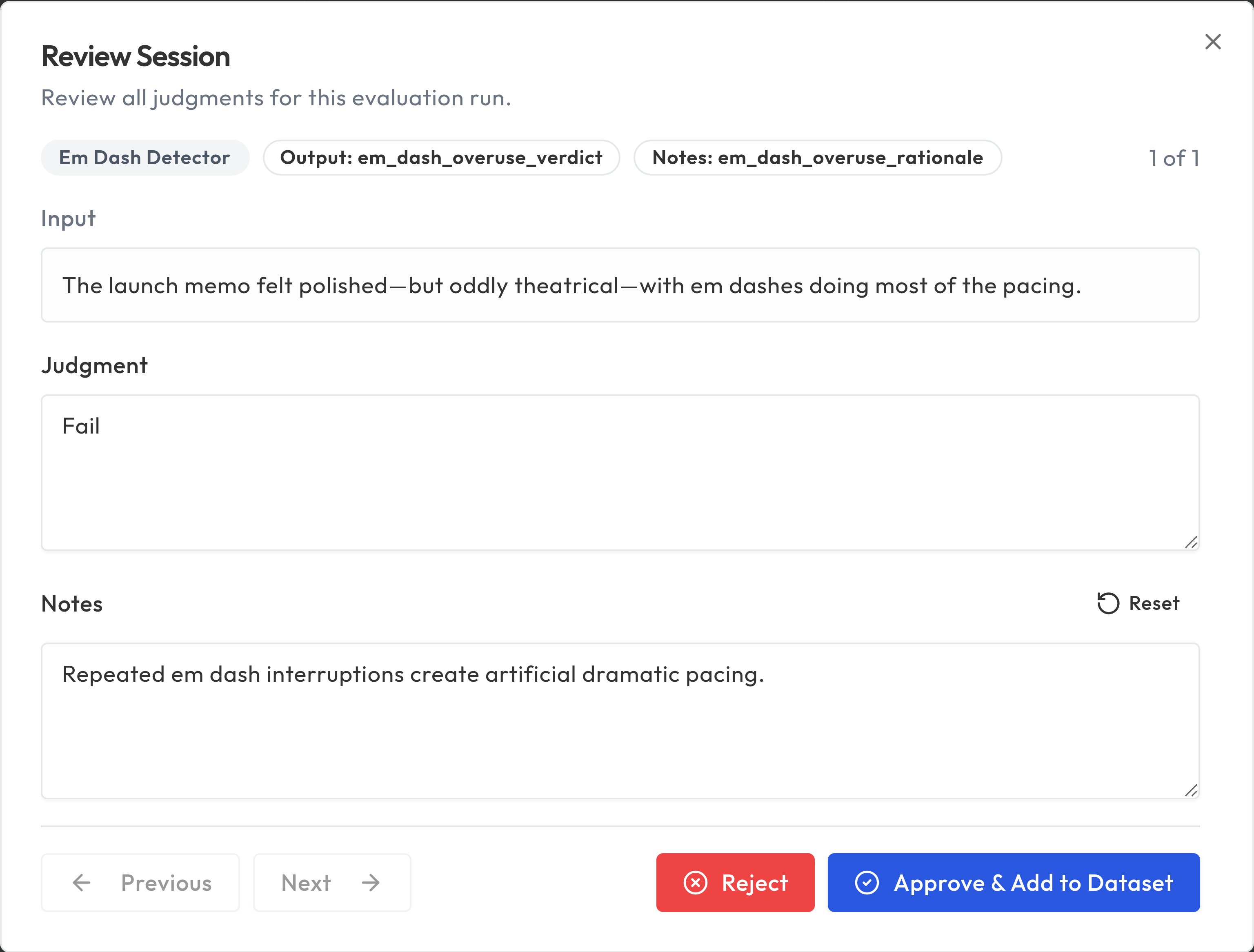
- Click Review to open a review session where you examine each judgment
- For each item, you can Approve the evaluation's judgment or Reject it
- On the final judgment, choose Approve & Add to Dataset to save approved results back to your dataset
When to use the Review Queue
- Disagreements: When the evaluation's judgment doesn't match your expert judgment
- Edge cases: Examples that are genuinely ambiguous or unusual
- Calibration: Periodically reviewing a sample to ensure evaluation quality stays high
- Training data: Building a curated dataset of examples with verified labels
Adding approved results to your dataset
When you approve results in the Review Queue, you can add them back into your dataset using the Approve & Add to Dataset action. This:
- Improves your datasets quality over time
- Provides better training examples for future evaluations
- Creates a documented record of expert decisions
Programmatic workflow
You can drive the entire flag-review-promote loop programmatically using the MCP integration or the REST API with a Platform API Key.
Via MCP
The three tools that cover this workflow are:
flag_review_item-- Flag an evaluation run for review. Pass therun_idof the evaluation run you want to examine. This creates one review item per output criterion.judge_review_item-- Submit a human judgment for a single review item. Pass theitem_id(fromlist_review_items), the correctjudgment_value(e.g."Pass"or"Fail"), and an optionalnotesstring.add_reviewed_items_to_dataset-- Promote all judged items for a run back into the source dataset. Pass the samerun_id. All items must have ajudgment_valueset before this step.
Via REST
The equivalent REST path uses POST /api/review-items/promote with a review:write scoped platform key:
import requests

headers = {"Authorization": "Bearer ts_pat_your_key_here"}
base = "https://api.truesight.goodeyelabs.com"

# Step 1: Flag a run for review
requests.post(f"{base}/api/review-items/flag", headers=headers,
              json={"eval_run_id": "run_abc123"})

# Step 2: List the review items to get their IDs
items = requests.get(f"{base}/api/review-items", headers=headers).json()["items"]

# Step 3: Judge each item
for item in items:
    requests.patch(f"{base}/api/review-items/{item['id']}", headers=headers,
                   json={"judgment_value": "Pass"})

# Step 4: Promote all judged items back into the dataset
response = requests.post(f"{base}/api/review-items/promote", headers=headers,
                         json={"eval_run_id": "run_abc123"})
print(response.json())  # {"success": true, "promoted_row_id": ..., "warnings": []}
The promote endpoint requires every review item for that run to have a judgment_value set. If any item is missing a judgment, the request returns a 400 error.
Continuous improvement cycle
Results and Review form a continuous improvement loop:
- Run evaluations on your data
- Review results to identify where the evaluation succeeds and fails
- Flag edge cases for the Review Queue
- Approve and add reviewed results back to your dataset
- Refine evaluations based on what you've learned
- Re-run to measure improvement
This cycle ensures your evaluations stay aligned with your expert judgment as your AI system and data evolve.
Best practices
- Review regularly: Don't let the Review Queue build up. Regular review keeps your evaluations calibrated.
- Focus on disagreements: The most valuable reviews are where you disagree with the evaluation.
- Document your reasoning: When overriding a judgment, note why. This helps when refining criteria later.
- Track trends: Monitor overall pass rates over time to detect drift in your AI system's quality.