Platform API Keys
Platform API keys let you access the Truesight REST API programmatically. Use them to integrate Truesight into scripts, CI/CD pipelines, AI agents, or any workflow that needs to create datasets, run evaluations, or read results without going through the web interface.
Overview
Platform API keys are different from the per-endpoint Live Evaluation keys (ts_sk_). While Live Evaluation keys are scoped to a single evaluation endpoint, platform API keys can access multiple Truesight resources based on the scopes you assign.
| Feature | Platform API Keys (ts_pat_) | Live Evaluation Keys (ts_sk_) |
|---|---|---|
| Purpose | General-purpose API access | Single evaluation endpoint |
| Scope | Multiple resources via scopes | One live evaluation |
| Auth identity | Acts as the creating user | Anonymous (no user context) |
| Created from | Settings page | Live Evaluations page |
Creating a key
- Navigate to Settings in the sidebar
- In the Truesight API Keys section, click Create Key
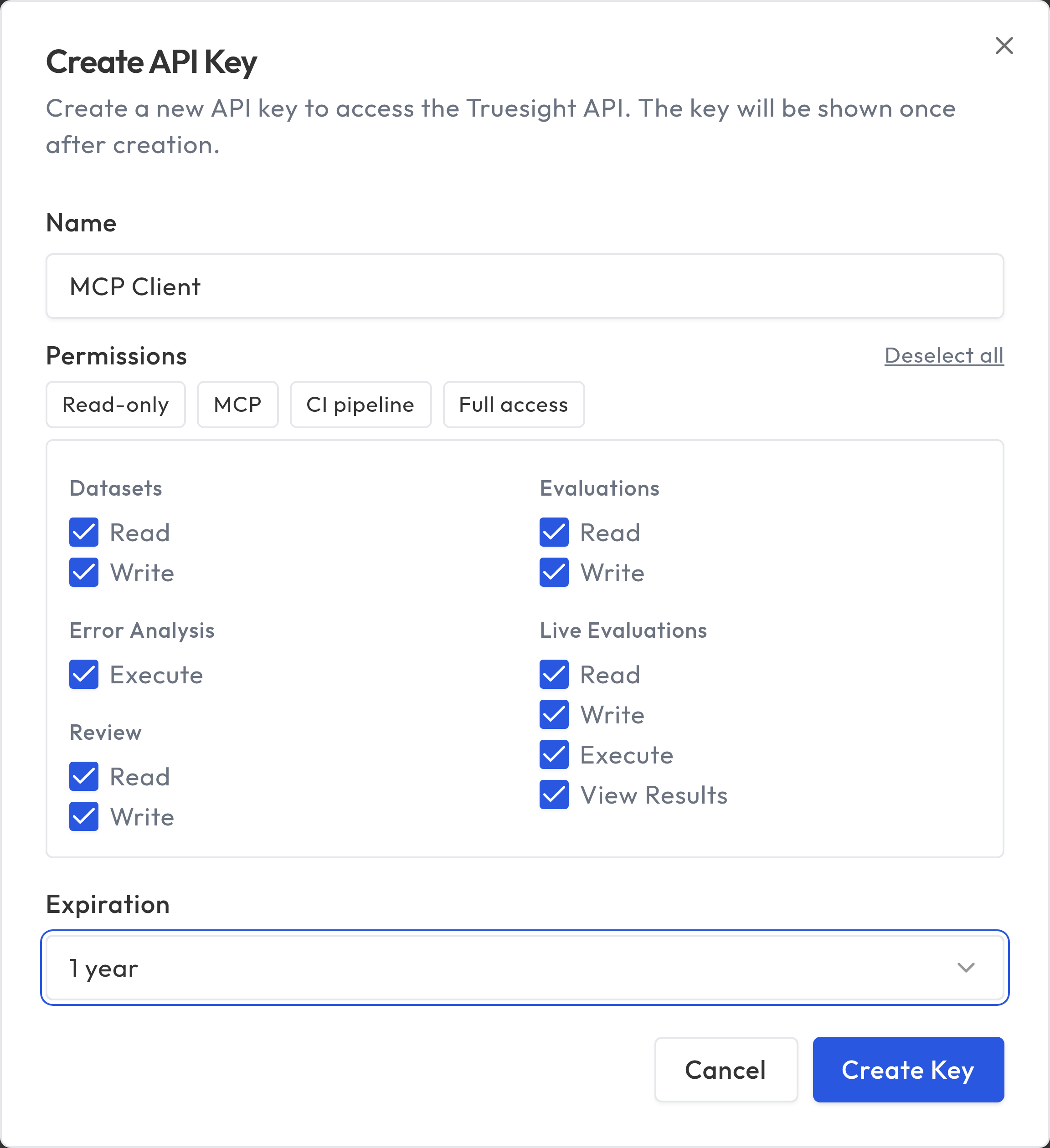
- Enter a descriptive name (e.g., "CI Pipeline", "MCP Client", "Data Sync Script")
- Select the scopes your key needs (see Available scopes below)
- Optionally set an expiration (30, 60, 90, or 365 days, or leave it with no expiration)
- Click Create
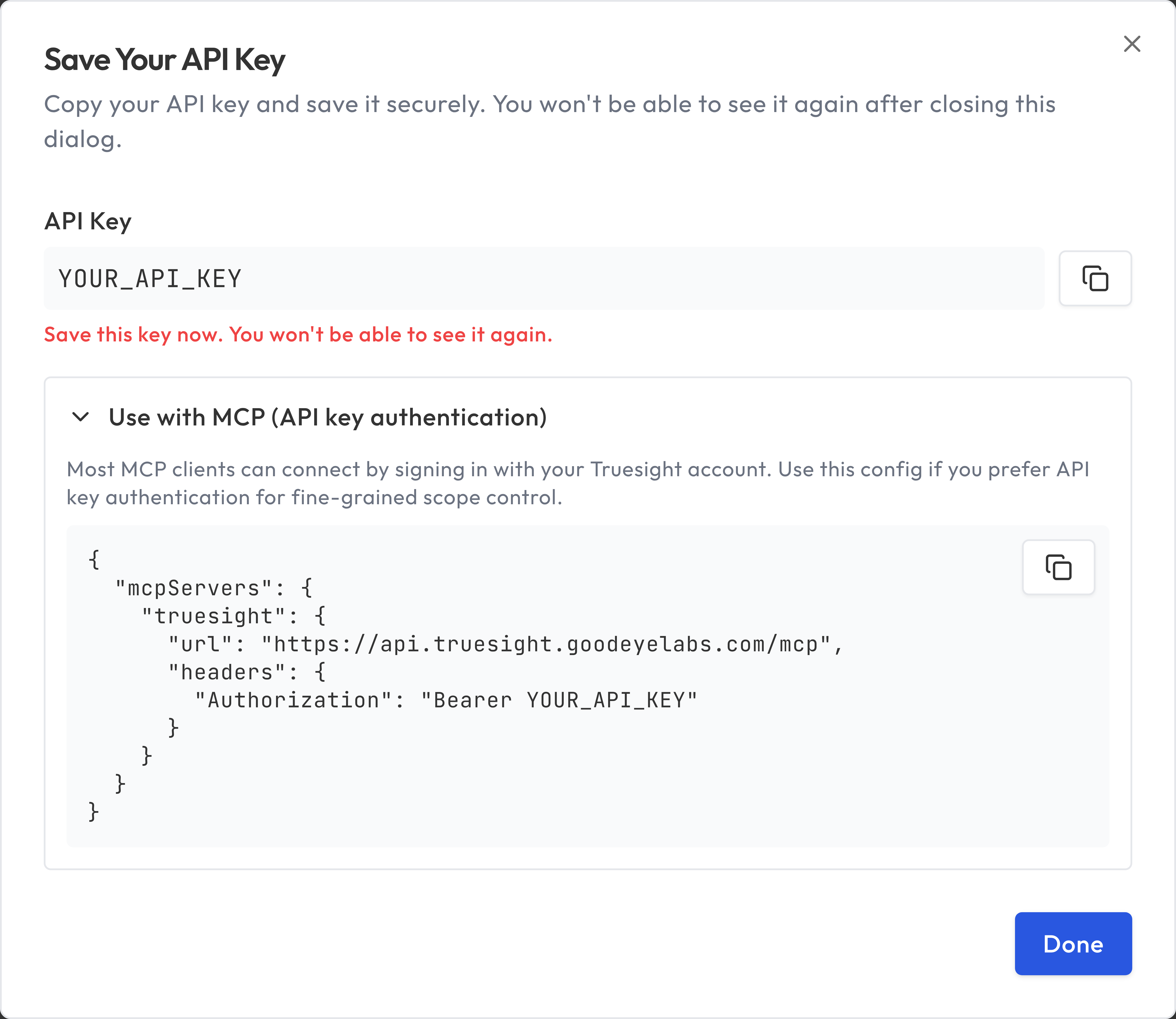
After creation, the full key is displayed once. Copy it immediately and store it securely. You will not be able to see the full key again.
Using the key
Include your platform API key in the Authorization header of your HTTP requests:
Authorization: Bearer ts_pat_your_key_here
cURL
curl -X GET "https://api.truesight.goodeyelabs.com/api/datasets" \
  -H "Authorization: Bearer ts_pat_your_key_here"
Python
import requests

response = requests.get(
    "https://api.truesight.goodeyelabs.com/api/datasets",
    headers={
        "Authorization": "Bearer ts_pat_your_key_here",
    },
)

datasets = response.json()
print(datasets)
JavaScript / TypeScript
const response = await fetch(
  "https://api.truesight.goodeyelabs.com/api/datasets",
  {
    headers: {
      "Authorization": "Bearer ts_pat_your_key_here",
    },
  }
);

const datasets = await response.json();
console.log(datasets);
Available scopes
When creating a key, you choose which scopes to assign. Each scope grants access to specific API endpoints. A key can only access endpoints covered by its assigned scopes.
| Scope | What it allows |
|---|---|
datasets:read | List datasets, get dataset details, get rows, export |
datasets:write | Create, upload, update, delete datasets; manage rows, columns, column roles, and judgment configs |
evaluations:read | List evaluations, get evaluation details, list variants |
evaluations:write | Create, update, delete evaluations; create variants; generate evaluations |
live-evaluations:read | List and view live evaluations |
live-evaluations:write | Deploy, update, deactivate, activate live evaluations; regenerate keys |
live-evaluations:execute | Run a live evaluation via POST /api/eval/{public_id} |
results:read | List evaluation runs, get run details |
review:read | List and view review queue items |
review:write | Flag, judge, reject, and promote review items |
error-analysis:execute | Suggest error notes, suggest error categories, consolidate categories |
Tip: Assign only the scopes your key needs. For a read-only integration, select only the :read scopes. For a CI pipeline that runs evaluations, live-evaluations:execute may be all you need.
Least-privilege recipes
Use the smallest scope set that supports your integration:
| Use case | Recommended scopes | Notes |
|---|---|---|
| Run a deployed Live Evaluation from an app or CI job | live-evaluations:execute | Enough for POST /api/eval/{public_id}. |
| Read dataset metadata and rows for export or sync | datasets:read | Covers both GET /api/datasets/{dataset_id} and GET /api/datasets/{dataset_id}/rows. |
| Upload or delete datasets from a script | datasets:write | Add datasets:read too if the script also verifies the uploaded dataset afterward. |
| Read evaluations and past run results | evaluations:read, results:read | Useful for reporting or dashboards. |
| Review queue triage tool | review:read, review:write | Add results:read only if you also fetch full run details. |
| MCP client that needs to browse datasets and evaluations | datasets:read, evaluations:read | Add datasets:write only if the agent must create or modify datasets. |
If a key is valid but missing the required scope, the API returns 403.
Common endpoints
The examples above use GET /api/datasets to illustrate the pattern. The same authentication approach works across all Truesight API resources. Here are the most commonly used endpoints for reading data:
| Endpoint | Scope required | Description |
|---|---|---|
GET /api/datasets | datasets:read | List all datasets you have access to |
GET /api/datasets/{dataset_id} | datasets:read | Get dataset metadata plus a preview of the first 10 rows. Use the dataset's public_id (for example ds_abc123) as the path parameter. |
GET /api/datasets/{dataset_id}/rows | datasets:read | Retrieve paginated dataset contents. Returns rows, aligned row_ids, total, page, page_size, and total_pages. |
GET /api/evaluations | evaluations:read | List all evaluations you have access to. Accepts page, page_size, and base_only (set to true to exclude evaluation variants) query parameters. |
GET /api/evaluations/{evaluation_id} | evaluations:read | Get full details for a specific evaluation including its configuration. |
GET /api/live-evaluations | live-evaluations:read | List all deployed live evaluations. Note: the api_key field is intentionally blank in list responses; only a masked preview is shown. Retrieve a single live evaluation by ID to get its masked api_key_preview. |
For example, to list your evaluations:
import requests

response = requests.get(
    "https://api.truesight.goodeyelabs.com/api/evaluations",
    headers={
        "Authorization": "Bearer ts_pat_your_key_here",
    },
    params={
        "page": 1,
        "page_size": 25,
        "base_only": True,  # exclude evaluation variants
    },
)

data = response.json()
for evaluation in data["items"]:
    print(evaluation["public_id"], evaluation["name"])
Running evaluations with a platform key
Platform API keys with the live-evaluations:execute scope can call the same evaluation endpoint as Live Evaluation keys. The difference is that platform keys authenticate as your user, so you need access to the live evaluation being called, and the path parameter must be the Live Evaluation public_id.
curl -X POST "https://api.truesight.goodeyelabs.com/api/eval/live_abc123" \
  -H "Authorization: Bearer ts_pat_your_key_here" \
  -H "Content-Type: application/json" \
  -d '{
    "inputs": {
      "user_query": "How do I return a jacket?",
      "bot_response": "You can return any item within 30 days."
    }
  }'
See the API Integration guide for details on the evaluation request format, response structure, and error handling.
If you call this endpoint without live-evaluations:execute, the API returns 403 with a message such as:
{
  "detail": "Insufficient API key scopes. Required: ['live-evaluations:execute']"
}
Managing keys
Viewing keys
Your active keys are listed in the Truesight API Keys section of Settings. Each key shows its name, prefix (first 12 characters), assigned scopes, creation date, and when it was last used.
Revoking keys
To revoke a key, click the delete icon next to it and confirm. Revoked keys stop working immediately and are removed from the list. Revocation cannot be undone. Create a new key if needed.
Access control
Platform API keys act as the user who created them. When a request is made with your key, Truesight checks your access to the requested resource using the same rules as the web interface:
- You can access resources you own
- You can access resources shared with you (with appropriate permission level)
- You can access resources shared with your teams
If you lose access to a resource (e.g., a share is removed), your API key will also lose access.
Security best practices
- Store keys securely. Treat platform API keys like passwords. Use environment variables or a secrets manager, and never commit them to version control.
- Use minimal scopes. Only assign the scopes your integration needs.
- Set expiration dates. For temporary integrations, set an expiration so keys don't linger.
- Rotate keys periodically. Create a new key and revoke the old one on a regular schedule.
- Revoke compromised keys immediately. If a key is exposed, revoke it from Settings right away.
Error handling
| Status | Meaning |
|---|---|
401 | Missing, invalid, expired, or revoked API key |
402 | Subscription inactive or insufficient credits |
403 | Key is valid but missing the required scope for this endpoint |
404 | Resource not found or you don't have access |
Error responses include a detail field:
{
  "detail": "Insufficient API key scopes. Required: ['datasets:read']"
}
MCP integration
Most MCP clients (Claude.ai, ChatGPT, Cursor, VS Code, and others) can connect to Truesight by signing in with your account. Platform API keys are an alternative for users who want fine-grained control over which tools are available. After creating a key, the key reveal dialog includes a pre-filled MCP configuration you can copy directly into your client. See the MCP Integration guide for setup instructions.